
How Diffusion Models Actually Work
How Diffusion Models Actually Work
Every AI image generator you've ever used runs on the same idea: destroy a picture with noise, teach a neural network to undo the damage, then run the whole thing backwards starting from pure static.
Type "an astronaut riding a horse" into an image generator and, a few seconds later, you get a picture nobody has ever seen before. The model didn't search for it, and it didn't draw it stroke by stroke. It started with television static and slowly cleaned it up until an astronaut on a horse appeared.
That sounds like a magic trick, but the idea behind it is almost embarrassingly simple. It's called a diffusion model, and once you see its two halves, every image generator on the market starts to make sense.
First, it destroys pictures on purpose
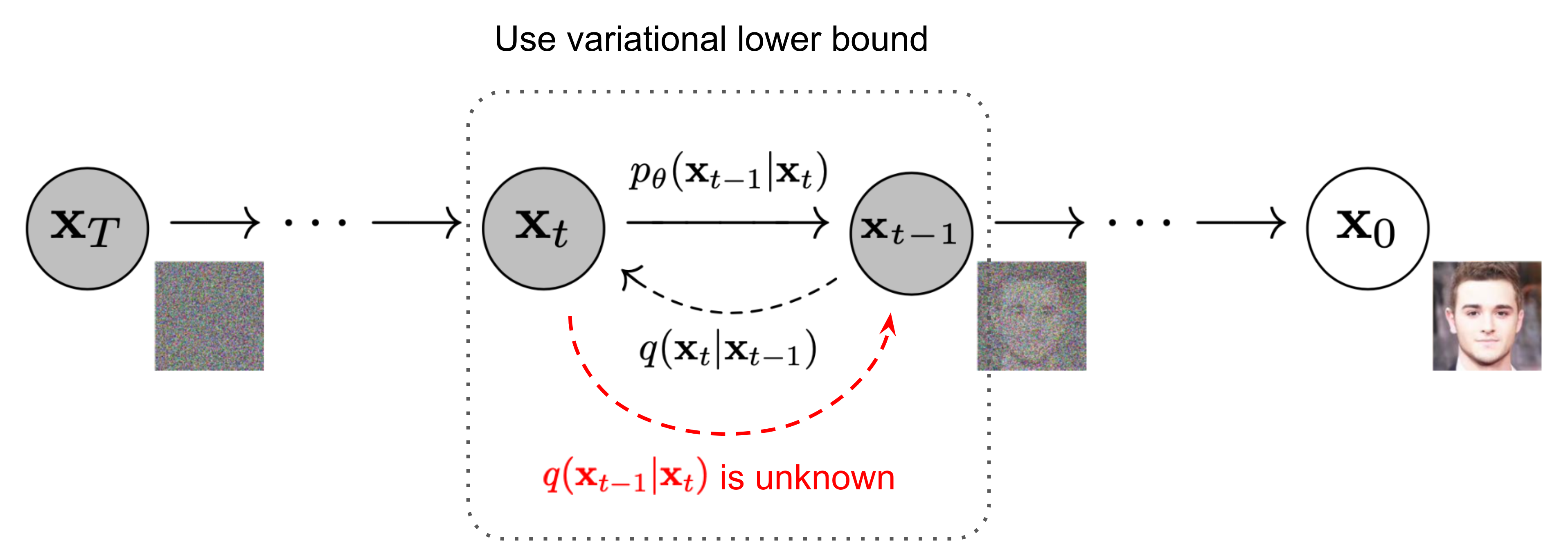
Training starts with a real photo. Then the model adds a tiny bit of random static — Gaussian noise, the same kind of grain you see on an old TV — and repeats that step again and again. After enough steps, the photo is gone. All that's left is pure noise.
This is the forward process, and here's the important part: nothing is learned here. The noise schedule — how much static gets added at each step — is fixed in advance. Lilian Weng's widely read explainer describes it as a chain of diffusion steps that slowly turns data into noise, inspired by how heat spreads in physics.
The classic version of this idea, Denoising Diffusion Probabilistic Models (Ho, Jain, and Abbeel, 2020), used 1,000 steps. And because the noise is added in a mathematically tidy way, you can jump straight to any step — say, step 500 — without simulating the 499 before it. That shortcut is what makes training practical at all.
Then it learns to undo the damage
Now comes the part the neural network actually learns: given a noisy image and the step number, guess what noise was added. Subtract that guess, and the image gets a little cleaner. Repeat 1,000 times and you arrive at a picture.
The network doing the guessing is usually a U-Net — shaped like a U, it shrinks an image down to its broad structure and expands it back out, with shortcut connections carrying fine detail across. The training target is beautifully boring: the difference between the noise the network predicted and the noise actually added. That's it. No adversarial game, no rival network trying to fool it.
That simplicity is why diffusion models took over. The older approach, GANs — where a generator and a discriminator fight each other — could produce great images but was famously unstable to train and tended to repeat the same few outputs. The original DDPM paper reported an FID score of 3.17 on CIFAR-10, a benchmark dataset of small images, which was state of the art at the time. Within a year, Dhariwal and Nichol showed diffusion models beating GANs outright on image quality.
The trick that made it fast enough to actually use
There's an obvious problem: 1,000 steps means 1,000 trips through a big neural network for one image. Early diffusion models took minutes per picture — fine for a research paper, useless for a product.
Two fixes changed that. The first was DDIM, from Song, Meng, and Ermon in 2020. It showed you could skip most of the steps — take 50 big jumps instead of 1,000 small ones — and still get a good image, using the exact same trained network. As a bonus, with one setting (called eta) turned to zero, the process becomes deterministic: the same starting static always gives the same picture. That's why image generators have a "seed" setting. The seed is just the starting noise.
The second fix was latent diffusion, from Rombach and colleagues in 2022. Instead of denoising a full-size image, you first squeeze it through a variational autoencoder — a compressor that turns a 512×512 photo into a 64×64 grid with 4 channels, about 48 times smaller — and run the whole noisy cleanup in that compressed space. You only decode back to pixels at the very end. This is the design Stable Diffusion is built on, and it's why a model with an 860-million-parameter U-Net can run on a GPU with 10GB of memory.
How your words steer the static
So far, nothing explains how a text prompt controls the picture. That job belongs to a text encoder — in Stable Diffusion's case, CLIP ViT-L/14, a model trained to match images with their captions. Your prompt becomes a set of numbers (an embedding), and the U-Net checks those numbers at every denoising step through cross-attention, which lets the image side of the network "pay attention" to the relevant words.
Then there's the slider everyone ends up fiddling with: guidance scale, from a technique called classifier-free guidance. At each step, the model makes two guesses — one with your prompt, one without — and the final guess is pushed toward the prompted one. A scale of 7.5, the long-standing default, is a compromise: higher values follow your words more literally but look oversaturated and samey; lower values give the model more freedom but drift from what you asked.
Negative prompts work the same way in reverse: the model treats your negative prompt as the thing to move away from. That's why "no blurry text, no extra fingers" actually does something — it's steering, not filtering.
What trips people up
First: more steps isn't always better. Past about 30–50 steps with a modern sampler, extra steps mostly burn time. If your image looks wrong, the prompt or the guidance scale is usually the problem, not the step count.
Second: garbled text isn't a bug in the usual sense. Remember that 8× compression: each spot in the compressed grid stands for an 8×8 block of pixels, and fine lettering simply doesn't survive that bottleneck. Newer models shrink the problem with better compressors, but it's a structural tradeoff, not a setting you can toggle.
Third: the model doesn't know what anything is. It has never seen a horse. It has only learned which patterns of pixels tend to survive each level of noise, given certain words nearby. That's why it can draw a convincing astronaut and still give him seven fingers — fingers are small details the noise process treats as expendable.
Try this first
If you want to feel how this fits together, open any image generator that shows its settings and run the same prompt twice: once with 20 steps, once with 50. Then try guidance at 3 and at 15. You'll see the whole theory in front of you — steps sharpening the image, guidance pulling it toward and then past your words. Diffusion models look like magic from the outside, but inside they're one idea, repeated patiently: add noise, learn to remove it, and start from static when you want something new.
Questions people actually ask
Why is it called "diffusion"?
The name comes from physics. Just as a drop of ink diffuses through water until it's evenly spread, the forward process spreads noise through an image until no trace of the original remains. The model then learns to run that spreading process in reverse.
Do diffusion models only make images?
No. The same noise-and-denoise idea works on anything you can add noise to: audio waveforms, video frames, 3D shapes, even protein structures. Images just got famous first because the results are easy to show off.
Can I run a diffusion model on my own computer?
Yes — one of the format's biggest advantages. Stable Diffusion's U-Net is about 860 million parameters and runs on a consumer GPU with around 10GB of memory. The open-weights ecosystem around it — community fine-tunes, samplers, and control tools — is a big part of why diffusion became the default way to generate images.
