
How LLM Quantization Actually Works
 |
How LLM Quantization Actually Works
It's the trick that lets a 70-billion-parameter model run on hardware that should be far too small for it. No retraining required — just clever rounding.
You download a 70-billion-parameter model, check the file size, and your heart sinks. At full precision it needs about 140 GB of memory just for its weights. Your GPU has 24 GB. Game over — unless you quantize it.
Quantization is the process of storing a model's weights — the billions of numbers it learned during training — at lower precision than they were trained at. Shrink each number from 16 bits to 4 bits, and that 140 GB model drops to roughly 41 GB. That's the whole trick, and it's why you can run serious models on a laptop today.
The obvious question: doesn't rounding billions of numbers wreck the model? Sometimes, if you do it naively. Done well, the damage is surprisingly small. Here's how.
It's rounding — with a ruler
A weight is just a number, usually stored as a 16-bit float (FP16, short for 16-bit floating point). That gives you about 65,000 possible values. An 8-bit integer (INT8) gives you 256. A 4-bit integer gives you 16. Yes, sixteen.
Quantization maps the float range onto those few slots. Take a group of weights ranging from -1.0 to 1.0. With INT8, you divide that range into 256 steps and round each weight to the nearest step. You also save a small number called the scale — the size of one step — so the model can convert the integers back to approximate floats when it computes.
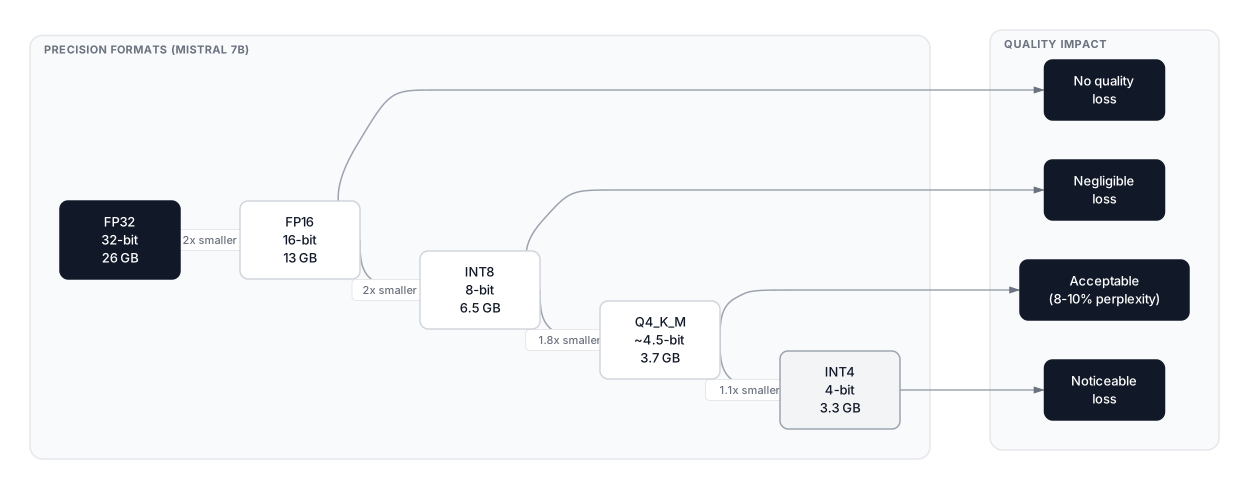
The key detail is the grouping. You don't use one scale for the entire model, because one outlier weight would stretch the range and crush everything else into a few slots. Instead, weights are quantized in small blocks — often 128 at a time — each with its own scale. That's why real-world sizes are a bit bigger than the raw math suggests: a 7-billion-parameter model at pure 4-bit would be 3.5 GB, but the popular Q4_K_M format lands at about 4.1 GB once scales and metadata are included, according to Let's Data Science's quantization guide.
That same guide's size table tells the story plainly. A Llama 3.1 8B goes from 16 GB at FP16 to 8 GB at INT8 to 4.7 GB at Q4_K_M. A 70B goes from 140 GB to 70 GB to 41 GB. Every halving of bits roughly halves the memory.
Why smaller is also faster
Here's the part people miss: quantization isn't only about fitting the model in memory. It's about speed too.
When a language model generates text one token at a time, the bottleneck usually isn't the arithmetic. It's fetching the weights from memory for every single token. Smaller weights mean less data to move, so each token comes out faster. As AWS's quantization guide puts it, for these memory-bound workloads, the bottleneck is often fetching weights from memory — and INT8 weights cut that traffic in half.
There's a catch, though. If the hardware converts those small integers back to 16-bit floats before multiplying, some of the speed gain evaporates. The full win comes from kernels — specialized routines — that do the math in low precision end to end. That's why the format you pick matters as much as the bit-width.
The three methods you'll actually meet
Naive rounding — just round everything and hope — is the baseline, and at 4 bits it hurts. Three smarter approaches dominate in practice.
GPTQ was the first method to make 4-bit quantization of billion-parameter models reliable. It feeds a small calibration set — about 128 representative samples — through the model and uses second-order math to correct each layer's rounding error before moving to the next, as the Let's Data Science guide explains. Think of it as rounding one layer, measuring the damage, and adjusting the remaining weights to compensate.
AWQ (Activation-aware Weight Quantization) starts from a different observation: not all weights matter equally. The AWQ paper found that protecting just the roughly 1% of weight channels that drive the largest activations greatly reduces quantization error. It scales those important channels up before quantizing, so they survive the rounding in better shape. Its companion runtime, TinyChat, ran 4-bit models more than 3x faster than the standard FP16 implementation, and made a 70B Llama-2 model deployable on mobile GPUs.
GGUF is the format you'll meet if you run models locally with Ollama or LM Studio. It's a file format, not just a quantization scheme, and it stores the quantized weights plus the model's metadata in one portable file. Its big advantage is flexibility: you can run it on CPU, split layers between CPU and GPU, or run fully on GPU, across Apple Silicon, NVIDIA, AMD, and CPU-only machines. Q4_K_M — the default most people download — is a GGUF variant.
One more name worth knowing: NF4, the 4-bit format inside the bitsandbytes library. It uses non-uniform levels designed around the fact that trained weights cluster around zero like a bell curve. NF4 is the format behind QLoRA, which lets you fine-tune a model while its base weights stay frozen at 4 bits — the trick that made fine-tuning big models on one consumer GPU practical.
What trips people up
First, the quality cliff. INT8 is nearly free — most benchmarks barely move. INT4 costs a little, and it's task-dependent: chat and summarization usually survive fine, but math and code are more sensitive to rounding. Below 4 bits, quality falls off fast for most models without special methods. Don't assume a 2-bit model is "almost as good" because the file is small.
Second, weight-only quantization doesn't shrink everything. The KV cache — the model's short-term memory of the conversation so far — is separate from the weights, and it grows with context length. A 4-bit model with a 128K-token conversation can still run out of memory. If your long-context setup is crashing, the weights probably aren't the problem anymore.
Third, calibration data matters. GPTQ and AWQ both learn from example inputs, and a quantizer calibrated on English chat will be slightly worse at code or other languages. If a quantized model feels oddly bad at your specific task, a different calibration — not a bigger model — is often the fix.
One thing to remember: quantization is an inference-time trick. It makes a finished model cheaper to run. It does not make training cheaper, and you can't "quantize away" a bad base model — rounding preserves what's there, flaws included.
So which one should you pick?
If you're just running models locally, take whatever your tool offers by default — usually a GGUF Q4_K_M file in Ollama or LM Studio — and only go up to Q5 or Q8 if you notice quality problems on your tasks. If you're serving on NVIDIA GPUs, AWQ or GPTQ through a server like vLLM is the standard choice. And if you want to fine-tune on one GPU, QLoRA with NF4 is the well-worn path.
The practical rule is simple: start at 4 bits, test on your actual prompts, and only spend more memory if the quality gap is real. Most of the time, the rounded model is close enough that you'd never notice — and the one that fits on your hardware beats the perfect one that doesn't run at all.
Questions people actually ask
Does quantization make a model dumber? Slightly, at 4 bits, and more on math and code than on chat. At 8 bits the difference is usually too small to measure on everyday tasks.
Can I quantize a model myself? Yes — tools like llama.cpp's quantizer and Hugging Face's tools will do it, though GPTQ and AWQ need a calibration set and some patience. Most people just download an already-quantized checkpoint from the model author's page.
Does quantization speed up training? No. Quantization is for running a finished model. Training still happens at high precision, and shrinking weights mid-training is a different research area entirely.
